Flight Booking
Sky is a web app that searches for flights and places orders through the Duffel API. It is the smallest complete example of an agent that performs an irreversible action with human approval hooked in the flow.
The problem
Searching for flights is easy and repeatable. Booking a flight is not. Canceling flight orders usually comes with conditions and penalities, some bookings cannot even be cancelled.

Booking process requires many steps of search and comparison. Any airport in Switzerland, first week of October, cheapest translate to three airports, five dates and many airlines. If a agent searches and filters through tool loops, fifteen round trips and numerous offer lists will go through the context window. For a generated program, it’s just two loops and simple comparison.
Harpe’s Solution
Using harpe, the agent actions can be defined and scoped in sandbox/API.jo:
interface Duffel
  def searchFlights(
    origin: String,
    destination: String,
    departureDate: String,
    passengerCount: Int,
    cabinClass: String
  ): SearchResult

  def getOffer(offerId: String): OfferDetail

  def createOrder(
    offerId: String,
    passengers: List[PassengerInfo],
    paymentAmount: String,
    paymentCurrency: String
  ): OrderConfirmation
end
Asks before it acts
The generated program calls duffel.createOrder(...) like any other operation.
It does not know that the call pauses, and has no way to skip the pause, because
the request is made inside the trusted implementation in sandbox/DuffelClient.jo:
val decision = approvals.request("Confirm booking", summary)
if decision is !Approvals.Approved then
  return new api.OrderConfirmation("", "", "", "", "Booking " + Approvals.wire(decision))
approvals is a constructor argument of DuffelClient, supplied by the trusted
runtime. The order is placed only after Approvals.Approved.
That is a build fact, not a convention. sandbox/jo.toml compiles guest against api alone and names runtime as link = true, so the implementation is supplied at link time. DuffelClient, approvals and the token are outside the guest’s vocabulary.
Three pieces connect that request to a button in the chat:
sandbox/Runtime.joopens the channel withBrokerApprovals.connect()and binds it before running the guest, so the paused program is waiting on the host.src/Interact.joimplementsapprove, rendering an Approve / Reject card in the browser and blocking until the user clicks one.- The decision travels back as
Approved,Rejected,TimedOut, orCancelled.
A rejection is not an error. It arrives in the program as
confirmation.error set to "Booking rejected", which the model reads and
turns back into conversation — asking what to change and searching again.
This is the pattern described in Human approval, applied to a real irreversible operation. The approval decides whether this booking proceeds.
Run it
The template is a complete project. Copy it into your own directory:
jo new my-booker --template typescope/harpe:flight-booker
cd my-booker
pip install -r requirements.txt
cp .env.example .env
You need two credentials:
- A Duffel test API key from app.duffel.com, under
Developers → API keys. It starts with
duffel_test_. Everything runs against Duffel’s test mode: no real flights are booked and no money is charged. - A model provider key.
DUFFEL_API_KEY=duffel_test_...
ANTHROPIC_API_KEY=...
MODEL=claude-opus-4-6
Start the web app:
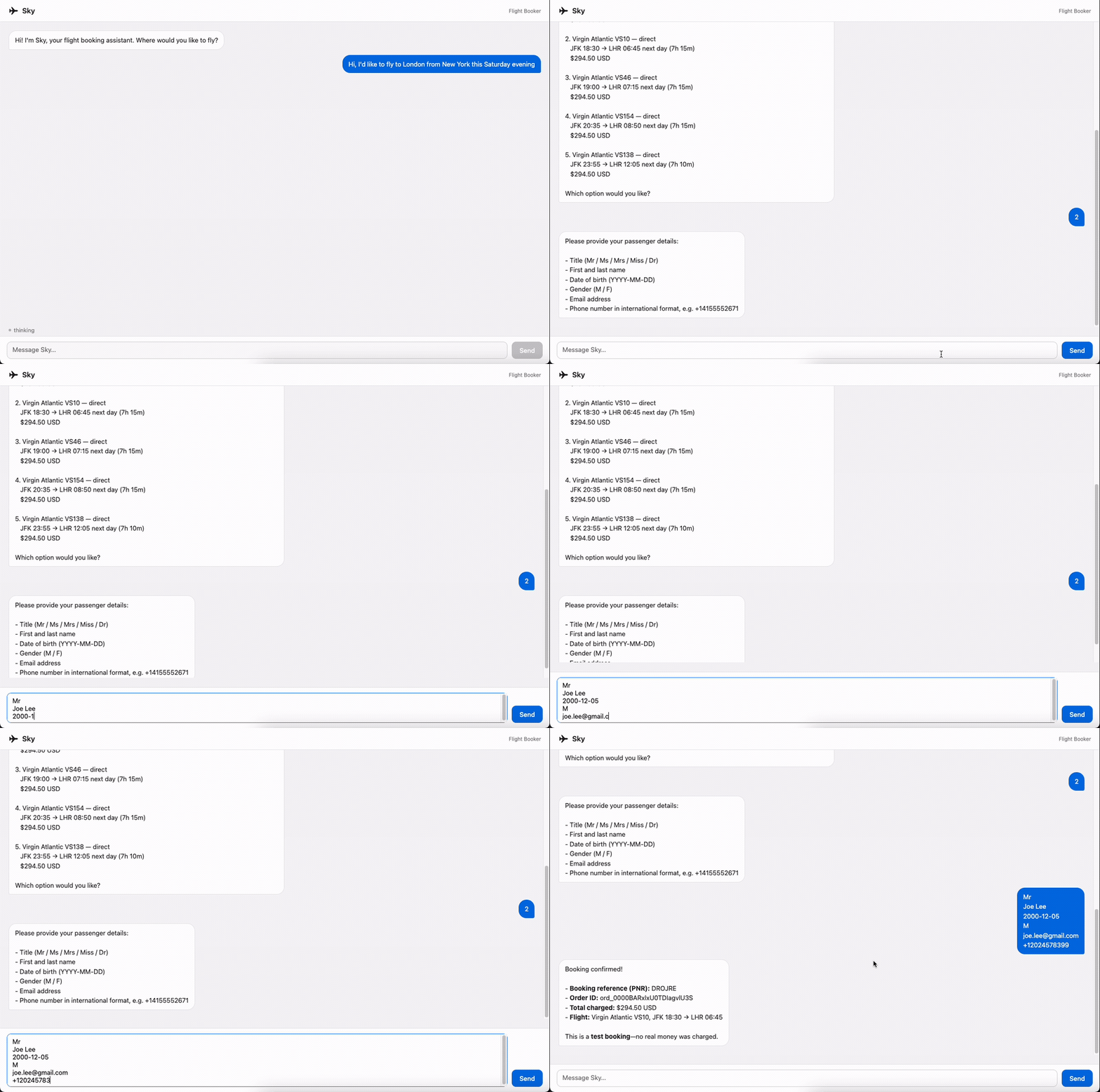
jo startThen open http://127.0.0.1:8765 in your browser. Describe a trip — “a flight from London to New York on October 1st” — and Sky searches, presents the cheapest offers, and collects passenger details in conversation.
Source Structure
my-booker/
  prompts/
    SYSTEM.md             # Sky's booking workflow and reply formatting
  src/
    Main.jo              # startup, credential checks, and HTTP server
    Session.jo           # per-session state and the agent turn
    Server.jo            # HTTP routing
    Interact.jo          # turn events and the browser approval card
  sandbox/
    API.jo               # the Duffel capability a generated program may call
    DuffelClient.jo      # the implementation, and where approval lives
    Runtime.jo           # broker connection and capability binding
    Task.jo              # the guest entry point runCode overwrites each turn
  skills/
    api.jo               # capability reference the model reads on demand
  assets/
index.html # the web UI- Edit
prompts/SYSTEM.mdto change the booking workflow, the offer formatting, or how much Sky asks before searching. - Edit
sandbox/API.joto change what the agent may do — add seat selection, or removecreateOrderto make the app search-only — then updateDuffelClient.joto match. - Edit the approval summary in
DuffelClient.joto change what the user sees before confirming. Build it from validated arguments, never from model text. - Edit
src/Interact.joto change how the approval card looks or how long it waits.