Observability
If a flower blooms and fades in a valley and no one is around to see it, does it exist?
That is the same fate of logs: without being seen and audited, they are dead. Observability makes dead logs alive.
Three properties
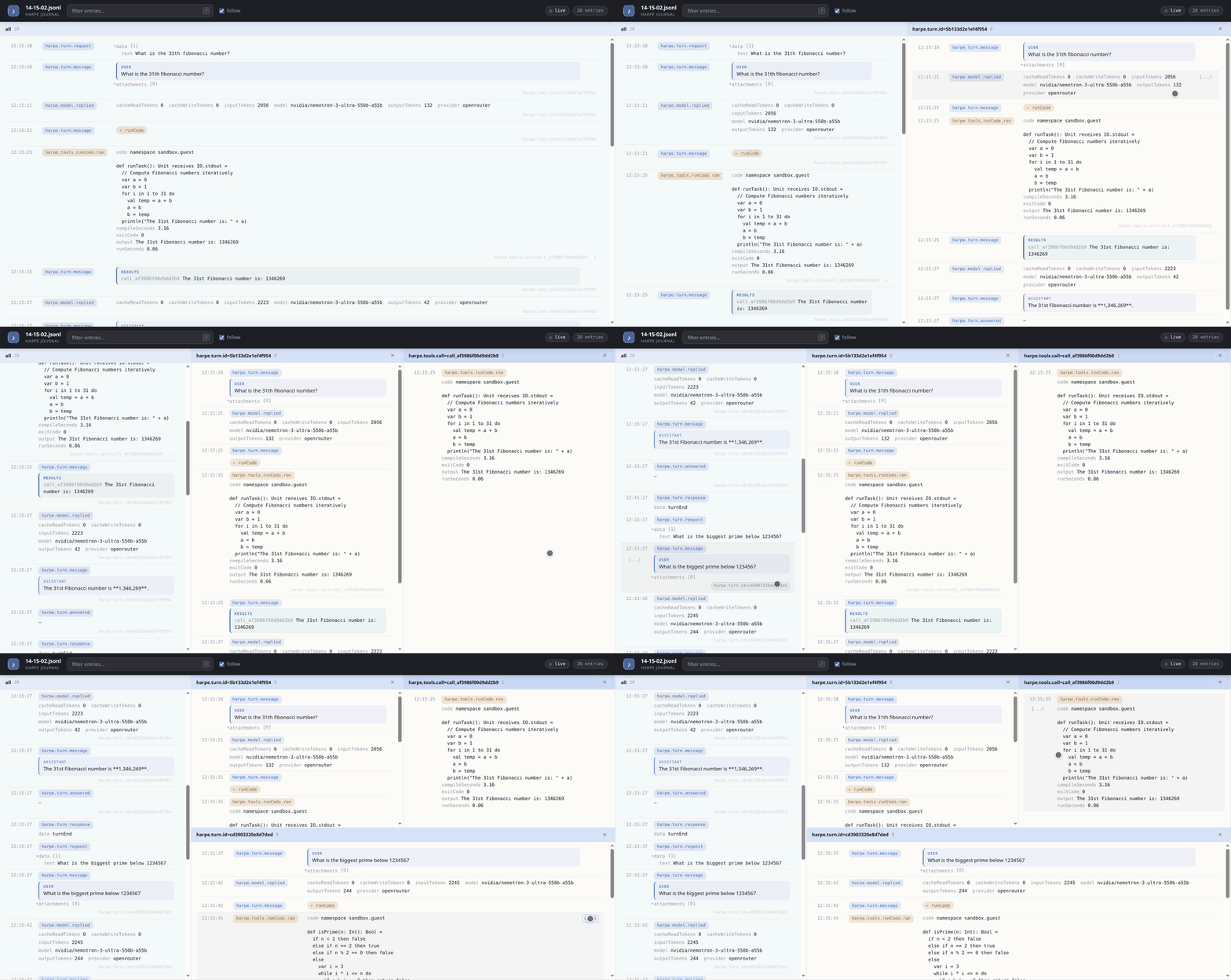
The log viewer shows logs live in a browser. Unlike traditional linear logs, it presents them structurally and contextually:
-
Structural. A logging item is structured data, so it is shown as structure rather than as text. A field holding a nested map or list becomes an interactive tree.
-
Contextual. The log viewer uses logging item’s
contextto support contextual grouping of events in additional lanes. This way, users can interactively narrow down the logs to a user, a session, or a specific turn. -
Content-agnostic. The viewer assumes only the structure of the logging framework, never the content of logging items. It works wherever the logging does, whatever the events and scopes are called.
Lanes
Lanes in the log viewer enable contextual focusing. A log item’s context
is a path of context ids from outermost scope to inner scope. The lanes
are that path’s prefixes:
- the leftmost lane is the empty prefix, containing all records in arrival order
- clicking a scope on a row opens a lane holding that scope’s records and everything nested under it
- a lane one level deeper sits to its right:
all › session › turn › tool call
Integrate the log viewer
ViewLogger is a Logger that keeps the last N (set by capacity parameter) entries in memory and
lets them be read back. Tee it beside the logger you already had, so the file
still gets everything:
val viewLog = new ViewLogger(capacity = 5000)
val log     = new TeeLogger([new JsonlLogger(sessionPath), viewLog])
Viewer serves that window as one route:
case Request.Get("/journal") => Viewer.respond(viewLog, title)The HTTP route is the whole integration point: it responds with a log events page and entries after the cursor when the page polls back.
An agent without its own HTTP server uses Viewer.start instead, which binds
a port on a daemon thread:
Viewer.start(viewLog, title, "127.0.0.1", port)answersTo names what a browser may call the viewer, which is what refuses a
hostile page that points its own name at 127.0.0.1. It defaults to
WebApp.Loopback, so a viewer reached by another name says so:
Viewer.start(viewLog, title, host, port, answersTo = host)The framework provides the mechanism and stops there. Whether to expose a journal, on which port, behind which path, and to whom is a driver’s decision — see Before you expose it.
Before you expose it
The viewer serves the journal’s contents to anyone who can reach it, and a journal contains the full conversation: prompts, replies, tool output, file names. It has no authentication.
That is why the framework binds nothing on its own. A driver that mounts the
route on a server it already runs is publishing it to everyone that server
reaches, so gate it — an environment switch checked before the route is one
shape — and keep Viewer.start on a loopback address. Reach a remote journal by
tunnelling the port or copying the file the teed backend wrote, not by opening
one up.
See also
- Transcript — how a conversation is recorded
- Logging — the event stream and how to send it elsewhere
- Deployment Checklist — what to keep and who may read it