Tools
A tool is a function the model can choose to call during a turn. Harpe runs the tool in your application and returns its result to the model. The model can use that result to answer the user or decide what to do next.
Agents do not receive tools automatically. Your application builds a Toolset
containing only the tools that agent should use. Harpe provides optional tools
for code mode, media, and skills. You can also add your own.
Adding tools to an agent
Each provided tool exposes a toolset that you can combine with others:
val runCode = RunCodeTool(sandboxDir, approvalDeadline = 610)

val tools =
    ++ runCode.toolset()
    ++ SkillTools.toolset(skillsDir)

val turn = Agent.ask:
  message
  brain = brain
  tools = tools
The model sees the name, description, and parameters of every tool in this set. When it calls one, the matching handler runs.
What a tool is
A tool has a spec for the model and a handler that runs in your application. The spec is what the model sees:
interface Tool
  def name: String
  def description: String
  def params: List[ToolParam]
endname— how the model calls it.description— prose the model reads to decide when to call it. Write it for the model, not for yourself.params— the typed inputs it accepts (below). Read every time a request is rendered, so a tool may derive its schema from live state.
The handler is what runs when the model calls the tool:
type Handler = (ToolInput, Interact) => ToolOutcome receives loggerA Toolset pairs each spec with its handler. Because your application builds
it, the handler can capture what it needs, such as an API token, session data
directory, or application service.
Pairing them at the point of wiring is what makes the two halves safe to separate. A spec with no handler would be a tool the model can call and nobody answers. A handler with no spec would be code the model is never told about. Neither is expressible: you add both or you add neither, so there is no rule for the engine to enforce and no way to get it wrong.
One wiring mistake does remain possible, and Toolset rejects it as the table is
built: wiring the same name twice — whether through add or by joining two
groups that share a name — rather than silently keeping one of them.
You describe the spec in Jo. Each provider renders its own wire spec from it, so you never hand-write JSON schema.
Every parameter is required, by design. Optionality buys a human caller ergonomics a model has no use for, and explicit is better. Give a parameter that does not always apply a documented value meaning “not applicable” instead.
See Structured output for why Harpe usually keeps machine-consumed data in the typed Jo program instead of formatting it as the agent’s final answer.
What ships
The framework provides the tools, and your driver wires them:
RunCodeTool(sandboxDir, approvalDeadline)—runCode, which compiles and runs a Jo program in the sandbox.UploadMediaTool—uploadMedia, which shows an image or PDF from the data directory directly to the chat model.SkillTools—skillsList/skillsRead/skillsSearch, read-only access to the agent’sskills/.
Each offers a toolset(...) that wires its specs to its handlers.
There is deliberately no default toolset: a driver names what its agent can do, so the whole surface is readable in one place.
Tools and capabilities
Tools and capabilities sit on opposite sides of the generated-program boundary:
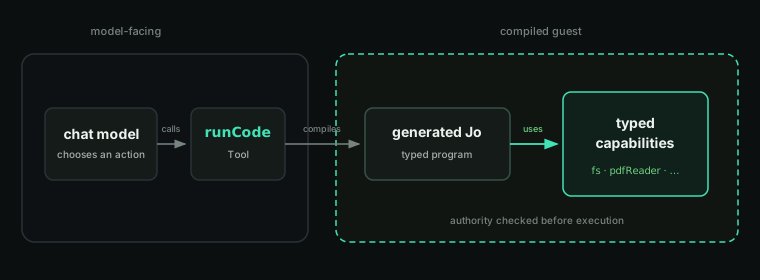
A tool is offered directly to the chat model. Its handler runs in the
application and returns a result to the model. runCode is a tool that compiles
and executes a generated Jo program.
A capability is offered to that generated program. It is not a model tool and does not appear in the provider’s tool schema. The compiler checks its use before the program runs. See Code and Sandboxing for the complete model.
Create your own tool
The Create a Tool tutorial walks through declaring parameters, returning results, handling errors, adding the tool to an agent, and organizing a tool that owns state or resources.